> ## Documentation Index
> Fetch the complete documentation index at: https://docs.aipower.org/llms.txt
> Use this file to discover all available pages before exploring further.
# API Reference
> Use AI Puffer REST endpoints from external applications.
AI Puffer exposes REST endpoints under the WordPress REST API.
Use the API when an external application needs to generate text, generate images, create embeddings, send a message to a chatbot, read chat logs, or add content to a vector store.
Base URL:
```text theme={null}
https://your-site.com/wp-json/aipkit/v1
```
## Authentication
Most endpoints require the AI Puffer REST API key.
1. Open **WordPress Admin > AI Puffer > Settings**.
2. Open **Developers**.
3. Enter a value in **REST API Key**.
4. Wait for the setting to save.
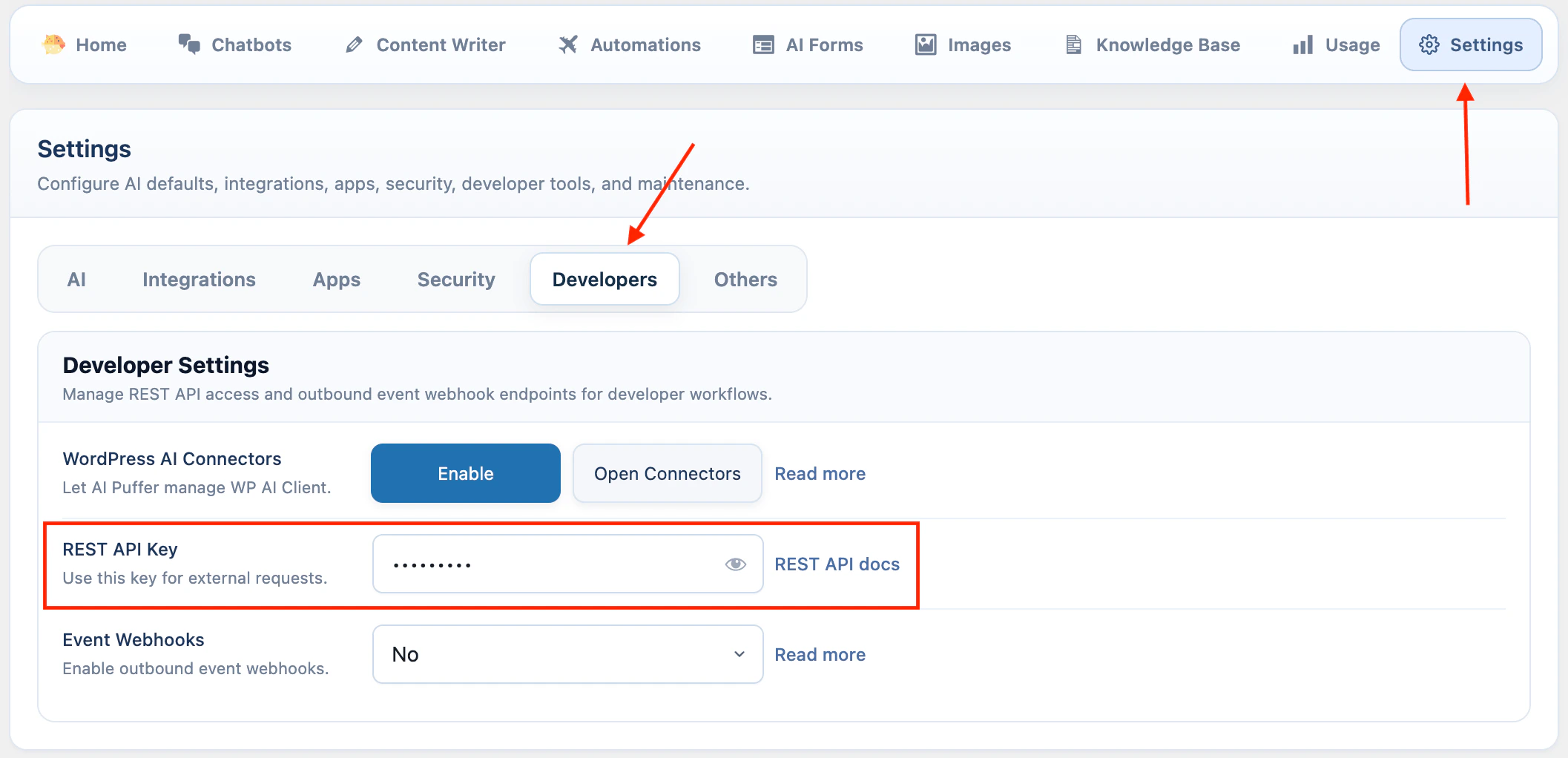 Leaving the field blank disables REST API access.
Treat the key like a password. Anyone with the key can call the enabled REST endpoints from outside WordPress.
### Send the key in a header
Use an `Authorization` header when possible.
```bash theme={null}
curl https://your-site.com/wp-json/aipkit/v1/logs \
-H "Authorization: Bearer YOUR_API_KEY"
```
### Send the key as a request parameter
You can also send the key as `aipkit_api_key`.
```bash theme={null}
curl https://your-site.com/wp-json/aipkit/v1/logs?aipkit_api_key=YOUR_API_KEY
```
## Endpoints
| Endpoint | Method | Use |
| --------------------------------- | ------ | -------------------------------------------------------------- |
| `/generate` | `POST` | Generate text with a configured AI provider. |
| `/images/generate` | `POST` | Generate images. |
| `/embeddings` | `POST` | Create embeddings from text. |
| `/chat/{bot_id}/message` | `POST` | Send a message to a chatbot. |
| `/logs` | `GET` | Read saved chat logs. |
| `/vector-stores/upsert` | `POST` | Embed text and upsert it into Pinecone, Qdrant, or Chroma. |
| `/chatbots/{bot_id}/embed-config` | `GET` | Read the embed config and HTML for an external chatbot widget. |
## Text generation
Generate a text response with one of the configured text providers.
```text theme={null}
POST /wp-json/aipkit/v1/generate
```
### Parameters
| Parameter | Type | Required | Notes |
| -------------------- | ------- | -------- | -------------------------------------------------------------------------------------------------- |
| `provider` | string | Yes | `openai`, `azure`, `google`, `openrouter`, `claude` for Anthropic, `deepseek`, `xai`, or `ollama`. |
| `model` | string | Yes | Model ID or Azure deployment ID. |
| `messages` | array | Yes | Chat-style messages with `role` and `content`. Roles: `system`, `user`, `assistant`. |
| `system_instruction` | string | No | Extra instruction text. Supports `[date]` and `[username]`. |
| `ai_params` | object | No | Overrides for AI parameters such as `temperature` or `max_completion_tokens`. |
| `stream` | boolean | No | This endpoint does not support streaming. Leave it as `false`. |
### Request
```bash theme={null}
curl -X POST https://your-site.com/wp-json/aipkit/v1/generate \
-H "Content-Type: application/json" \
-H "Authorization: Bearer YOUR_API_KEY" \
-d '{
"provider": "openai",
"model": "gpt-4o-mini",
"messages": [
{
"role": "user",
"content": "Write a two sentence product description for a handmade ceramic mug."
}
],
"ai_params": {
"temperature": 0.7
}
}'
```
### Response
```json theme={null}
{
"content": "A handmade ceramic mug with a simple shape and a smooth glazed finish. Suitable for coffee, tea, or daily desk use.",
"usage": {
"input_tokens": 18,
"output_tokens": 25,
"total_tokens": 43
},
"provider": "OpenAI",
"model": "gpt-4o-mini"
}
```
## Image generation
Generate images from a text prompt.
```text theme={null}
POST /wp-json/aipkit/v1/images/generate
```
### Parameters
| Parameter | Type | Required | Notes |
| ----------------- | ------- | -------- | --------------------------------------------------------------------------------------------------------------------- |
| `prompt` | string | Yes | Text prompt for the image. |
| `provider` | string | No | `openai`, `azure`, or `google`. Default: `openai`. |
| `model` | string | No | Image model ID. Uses plugin settings if omitted. |
| `n` | integer | No | Number of images. Minimum `1`, maximum `10`. Default: `1`. |
| `size` | string | No | Supported values include `1024x1024`, `1792x1024`, `1024x1792`, `1536x1024`, `1024x1536`, `1024x768`, and `768x1024`. |
| `quality` | string | No | `standard` or `hd`, when supported by the selected model. |
| `style` | string | No | `vivid` or `natural`, when supported by the selected model. |
| `response_format` | string | No | `url` or `b64_json`. Default: `url`. |
### Request
```bash theme={null}
curl -X POST https://your-site.com/wp-json/aipkit/v1/images/generate \
-H "Content-Type: application/json" \
-H "Authorization: Bearer YOUR_API_KEY" \
-d '{
"provider": "openai",
"model": "gpt-image-1",
"prompt": "A clean product photo of a handmade ceramic mug on a white table",
"n": 1,
"size": "1024x1024",
"response_format": "url"
}'
```
### Response
```json theme={null}
{
"images": [
{
"url": "https://example.com/generated-image.png",
"b64_json": null,
"revised_prompt": null
}
],
"usage": null,
"message": "1 image generated successfully."
}
```
## Embeddings
Create embeddings from one string or an array of strings.
```text theme={null}
POST /wp-json/aipkit/v1/embeddings
```
### Parameters
| Parameter | Type | Required | Notes |
| ----------------------- | --------------- | -------- | ------------------------------------------------------------------- |
| `provider` | string | Yes | `openai`, `google`, `azure`, or `openrouter`. |
| `model` | string | Yes | Embedding model ID or Azure deployment ID. |
| `input` | string or array | Yes | Text to embed. |
| `dimensions` | integer | No | OpenAI, OpenRouter, or Azure output dimensions when supported. |
| `encoding_format` | string | No | OpenAI or OpenRouter format: `float` or `base64`. Default: `float`. |
| `task_type` | string | No | Google embedding task type. |
| `output_dimensionality` | integer | No | Google embedding output dimension size. |
| `user` | string | No | End-user identifier for OpenAI or Azure monitoring. |
Google `task_type` values:
```text theme={null}
SEMANTIC_SIMILARITY
CLASSIFICATION
CLUSTERING
RETRIEVAL_DOCUMENT
RETRIEVAL_QUERY
QUESTION_ANSWERING
FACT_VERIFICATION
CODE_RETRIEVAL_QUERY
```
### Request
```bash theme={null}
curl -X POST https://your-site.com/wp-json/aipkit/v1/embeddings \
-H "Content-Type: application/json" \
-H "Authorization: Bearer YOUR_API_KEY" \
-d '{
"provider": "openai",
"model": "text-embedding-3-small",
"input": "AI Puffer is a WordPress plugin."
}'
```
### Response
```json theme={null}
{
"embeddings": [
[-0.0069, -0.0053, 0.0124]
],
"usage": {
"input_tokens": 8,
"total_tokens": 8
},
"provider": "OpenAI",
"model": "text-embedding-3-small"
}
```
## Chat message
Send a message to one chatbot.
The chatbot must exist in WordPress. The request uses the chatbot settings saved in AI Puffer.
```text theme={null}
POST /wp-json/aipkit/v1/chat/{bot_id}/message
```
### Parameters
| Parameter | Type | Required | Notes |
| ---------- | ------- | -------- | ------------------------------------------------------------------------------------------ |
| `bot_id` | integer | Yes | Chatbot ID in the URL. |
| `messages` | array | Yes | Conversation history. Roles: `user` and `assistant`. The last message must be from `user`. |
### Request
```bash theme={null}
curl -X POST https://your-site.com/wp-json/aipkit/v1/chat/123/message \
-H "Content-Type: application/json" \
-H "Authorization: Bearer YOUR_API_KEY" \
-d '{
"messages": [
{
"role": "user",
"content": "What can you help with?"
}
]
}'
```
### Response
```json theme={null}
{
"reply": "I can answer questions using the chatbot settings configured in WordPress.",
"usage": {
"input_tokens": 15,
"output_tokens": 13,
"total_tokens": 28
},
"bot_id": 123,
"model": "gpt-4o-mini"
}
```
## Chat logs
Read saved chatbot conversation logs.
```text theme={null}
GET /wp-json/aipkit/v1/logs
```
### Parameters
| Parameter | Type | Required | Notes |
| ---------------- | ------- | -------- | --------------------------------------------- |
| `page` | integer | No | Page number. Default: `1`. |
| `per_page` | integer | No | Logs per page. Default: `20`, maximum: `100`. |
| `bot_id` | integer | No | Filter by chatbot ID. |
| `user_search` | string | No | Search display name, username, or email. |
| `message_search` | string | No | Search conversation content. |
The response includes pagination headers:
| Header | Meaning |
| ----------------- | -------------------- |
| `X-WP-Total` | Total matching logs. |
| `X-WP-TotalPages` | Total pages. |
### Request
```bash theme={null}
curl "https://your-site.com/wp-json/aipkit/v1/logs?per_page=10&bot_id=123" \
-H "Authorization: Bearer YOUR_API_KEY"
```
### Response
```json theme={null}
[
{
"id": "1",
"bot_id": "123",
"user_id": "1",
"session_id": null,
"conversation_uuid": "e8a3c-b3a1-4f9e",
"messages": "[...]",
"message_count": "4",
"last_message_ts": "1724081015",
"created_at": "2026-04-25 10:00:00",
"bot_name": "Support Bot",
"user_display_name": "admin"
}
]
```
## Vector store upsert
Embed text and add the vectors to Pinecone, Qdrant, or Chroma.
The target index or collection must already exist. AI Puffer creates embeddings, then sends vectors to the selected vector database.
```text theme={null}
POST /wp-json/aipkit/v1/vector-stores/upsert
```
### Parameters
| Parameter | Type | Required | Notes |
| -------------------- | ------ | -------- | ----------------------------------------------------------------------- |
| `provider` | string | Yes | `pinecone`, `qdrant`, or `chroma`. |
| `target_id` | string | Yes | Pinecone index name, Qdrant collection name, or Chroma collection name. |
| `vectors` | array | Yes | Objects with `content`. Optional `id` and `metadata`. |
| `embedding_provider` | string | Yes | `openai`, `google`, `azure`, or `openrouter`. |
| `embedding_model` | string | Yes | Embedding model ID or Azure deployment ID. |
| `namespace` | string | No | Pinecone namespace. Ignored by Qdrant and Chroma. |
Each `vectors` item must include:
| Field | Type | Required | Notes |
| ---------- | ------ | -------- | ----------------------------------------------------------------------- |
| `content` | string | Yes | Text to embed and store. |
| `id` | string | No | Vector ID. AI Puffer generates one if omitted. |
| `metadata` | object | No | Extra metadata. AI Puffer also stores the original content in metadata. |
### Request
```bash theme={null}
curl -X POST https://your-site.com/wp-json/aipkit/v1/vector-stores/upsert \
-H "Content-Type: application/json" \
-H "Authorization: Bearer YOUR_API_KEY" \
-d '{
"provider": "pinecone",
"target_id": "site-knowledge",
"embedding_provider": "openai",
"embedding_model": "text-embedding-3-small",
"namespace": "docs",
"vectors": [
{
"id": "intro",
"content": "AI Puffer adds AI tools to WordPress.",
"metadata": {
"source": "manual"
}
}
]
}'
```
### Response
```json theme={null}
{
"upserted_count": 1,
"status": "success"
}
```
## Chatbot embed config
Read the config and rendered HTML for an externally embedded chatbot.
This endpoint is not authenticated with the REST API key. Access is controlled by the chatbot's embed settings and allowed domains.
```text theme={null}
GET /wp-json/aipkit/v1/chatbots/{bot_id}/embed-config
```
### Parameters
| Parameter | Type | Required | Notes |
| --------- | ------- | -------- | ---------------------- |
| `bot_id` | integer | Yes | Chatbot ID in the URL. |
### Response
```json theme={null}
{
"config": {
"botId": 123,
"assetUrls": {
"css": "https://your-site.com/wp-content/plugins/.../public-main.bundle.css",
"mainJs": "https://your-site.com/wp-content/plugins/.../public-main.bundle.js"
}
},
"html": "
Leaving the field blank disables REST API access.
Treat the key like a password. Anyone with the key can call the enabled REST endpoints from outside WordPress.
### Send the key in a header
Use an `Authorization` header when possible.
```bash theme={null}
curl https://your-site.com/wp-json/aipkit/v1/logs \
-H "Authorization: Bearer YOUR_API_KEY"
```
### Send the key as a request parameter
You can also send the key as `aipkit_api_key`.
```bash theme={null}
curl https://your-site.com/wp-json/aipkit/v1/logs?aipkit_api_key=YOUR_API_KEY
```
## Endpoints
| Endpoint | Method | Use |
| --------------------------------- | ------ | -------------------------------------------------------------- |
| `/generate` | `POST` | Generate text with a configured AI provider. |
| `/images/generate` | `POST` | Generate images. |
| `/embeddings` | `POST` | Create embeddings from text. |
| `/chat/{bot_id}/message` | `POST` | Send a message to a chatbot. |
| `/logs` | `GET` | Read saved chat logs. |
| `/vector-stores/upsert` | `POST` | Embed text and upsert it into Pinecone, Qdrant, or Chroma. |
| `/chatbots/{bot_id}/embed-config` | `GET` | Read the embed config and HTML for an external chatbot widget. |
## Text generation
Generate a text response with one of the configured text providers.
```text theme={null}
POST /wp-json/aipkit/v1/generate
```
### Parameters
| Parameter | Type | Required | Notes |
| -------------------- | ------- | -------- | -------------------------------------------------------------------------------------------------- |
| `provider` | string | Yes | `openai`, `azure`, `google`, `openrouter`, `claude` for Anthropic, `deepseek`, `xai`, or `ollama`. |
| `model` | string | Yes | Model ID or Azure deployment ID. |
| `messages` | array | Yes | Chat-style messages with `role` and `content`. Roles: `system`, `user`, `assistant`. |
| `system_instruction` | string | No | Extra instruction text. Supports `[date]` and `[username]`. |
| `ai_params` | object | No | Overrides for AI parameters such as `temperature` or `max_completion_tokens`. |
| `stream` | boolean | No | This endpoint does not support streaming. Leave it as `false`. |
### Request
```bash theme={null}
curl -X POST https://your-site.com/wp-json/aipkit/v1/generate \
-H "Content-Type: application/json" \
-H "Authorization: Bearer YOUR_API_KEY" \
-d '{
"provider": "openai",
"model": "gpt-4o-mini",
"messages": [
{
"role": "user",
"content": "Write a two sentence product description for a handmade ceramic mug."
}
],
"ai_params": {
"temperature": 0.7
}
}'
```
### Response
```json theme={null}
{
"content": "A handmade ceramic mug with a simple shape and a smooth glazed finish. Suitable for coffee, tea, or daily desk use.",
"usage": {
"input_tokens": 18,
"output_tokens": 25,
"total_tokens": 43
},
"provider": "OpenAI",
"model": "gpt-4o-mini"
}
```
## Image generation
Generate images from a text prompt.
```text theme={null}
POST /wp-json/aipkit/v1/images/generate
```
### Parameters
| Parameter | Type | Required | Notes |
| ----------------- | ------- | -------- | --------------------------------------------------------------------------------------------------------------------- |
| `prompt` | string | Yes | Text prompt for the image. |
| `provider` | string | No | `openai`, `azure`, or `google`. Default: `openai`. |
| `model` | string | No | Image model ID. Uses plugin settings if omitted. |
| `n` | integer | No | Number of images. Minimum `1`, maximum `10`. Default: `1`. |
| `size` | string | No | Supported values include `1024x1024`, `1792x1024`, `1024x1792`, `1536x1024`, `1024x1536`, `1024x768`, and `768x1024`. |
| `quality` | string | No | `standard` or `hd`, when supported by the selected model. |
| `style` | string | No | `vivid` or `natural`, when supported by the selected model. |
| `response_format` | string | No | `url` or `b64_json`. Default: `url`. |
### Request
```bash theme={null}
curl -X POST https://your-site.com/wp-json/aipkit/v1/images/generate \
-H "Content-Type: application/json" \
-H "Authorization: Bearer YOUR_API_KEY" \
-d '{
"provider": "openai",
"model": "gpt-image-1",
"prompt": "A clean product photo of a handmade ceramic mug on a white table",
"n": 1,
"size": "1024x1024",
"response_format": "url"
}'
```
### Response
```json theme={null}
{
"images": [
{
"url": "https://example.com/generated-image.png",
"b64_json": null,
"revised_prompt": null
}
],
"usage": null,
"message": "1 image generated successfully."
}
```
## Embeddings
Create embeddings from one string or an array of strings.
```text theme={null}
POST /wp-json/aipkit/v1/embeddings
```
### Parameters
| Parameter | Type | Required | Notes |
| ----------------------- | --------------- | -------- | ------------------------------------------------------------------- |
| `provider` | string | Yes | `openai`, `google`, `azure`, or `openrouter`. |
| `model` | string | Yes | Embedding model ID or Azure deployment ID. |
| `input` | string or array | Yes | Text to embed. |
| `dimensions` | integer | No | OpenAI, OpenRouter, or Azure output dimensions when supported. |
| `encoding_format` | string | No | OpenAI or OpenRouter format: `float` or `base64`. Default: `float`. |
| `task_type` | string | No | Google embedding task type. |
| `output_dimensionality` | integer | No | Google embedding output dimension size. |
| `user` | string | No | End-user identifier for OpenAI or Azure monitoring. |
Google `task_type` values:
```text theme={null}
SEMANTIC_SIMILARITY
CLASSIFICATION
CLUSTERING
RETRIEVAL_DOCUMENT
RETRIEVAL_QUERY
QUESTION_ANSWERING
FACT_VERIFICATION
CODE_RETRIEVAL_QUERY
```
### Request
```bash theme={null}
curl -X POST https://your-site.com/wp-json/aipkit/v1/embeddings \
-H "Content-Type: application/json" \
-H "Authorization: Bearer YOUR_API_KEY" \
-d '{
"provider": "openai",
"model": "text-embedding-3-small",
"input": "AI Puffer is a WordPress plugin."
}'
```
### Response
```json theme={null}
{
"embeddings": [
[-0.0069, -0.0053, 0.0124]
],
"usage": {
"input_tokens": 8,
"total_tokens": 8
},
"provider": "OpenAI",
"model": "text-embedding-3-small"
}
```
## Chat message
Send a message to one chatbot.
The chatbot must exist in WordPress. The request uses the chatbot settings saved in AI Puffer.
```text theme={null}
POST /wp-json/aipkit/v1/chat/{bot_id}/message
```
### Parameters
| Parameter | Type | Required | Notes |
| ---------- | ------- | -------- | ------------------------------------------------------------------------------------------ |
| `bot_id` | integer | Yes | Chatbot ID in the URL. |
| `messages` | array | Yes | Conversation history. Roles: `user` and `assistant`. The last message must be from `user`. |
### Request
```bash theme={null}
curl -X POST https://your-site.com/wp-json/aipkit/v1/chat/123/message \
-H "Content-Type: application/json" \
-H "Authorization: Bearer YOUR_API_KEY" \
-d '{
"messages": [
{
"role": "user",
"content": "What can you help with?"
}
]
}'
```
### Response
```json theme={null}
{
"reply": "I can answer questions using the chatbot settings configured in WordPress.",
"usage": {
"input_tokens": 15,
"output_tokens": 13,
"total_tokens": 28
},
"bot_id": 123,
"model": "gpt-4o-mini"
}
```
## Chat logs
Read saved chatbot conversation logs.
```text theme={null}
GET /wp-json/aipkit/v1/logs
```
### Parameters
| Parameter | Type | Required | Notes |
| ---------------- | ------- | -------- | --------------------------------------------- |
| `page` | integer | No | Page number. Default: `1`. |
| `per_page` | integer | No | Logs per page. Default: `20`, maximum: `100`. |
| `bot_id` | integer | No | Filter by chatbot ID. |
| `user_search` | string | No | Search display name, username, or email. |
| `message_search` | string | No | Search conversation content. |
The response includes pagination headers:
| Header | Meaning |
| ----------------- | -------------------- |
| `X-WP-Total` | Total matching logs. |
| `X-WP-TotalPages` | Total pages. |
### Request
```bash theme={null}
curl "https://your-site.com/wp-json/aipkit/v1/logs?per_page=10&bot_id=123" \
-H "Authorization: Bearer YOUR_API_KEY"
```
### Response
```json theme={null}
[
{
"id": "1",
"bot_id": "123",
"user_id": "1",
"session_id": null,
"conversation_uuid": "e8a3c-b3a1-4f9e",
"messages": "[...]",
"message_count": "4",
"last_message_ts": "1724081015",
"created_at": "2026-04-25 10:00:00",
"bot_name": "Support Bot",
"user_display_name": "admin"
}
]
```
## Vector store upsert
Embed text and add the vectors to Pinecone, Qdrant, or Chroma.
The target index or collection must already exist. AI Puffer creates embeddings, then sends vectors to the selected vector database.
```text theme={null}
POST /wp-json/aipkit/v1/vector-stores/upsert
```
### Parameters
| Parameter | Type | Required | Notes |
| -------------------- | ------ | -------- | ----------------------------------------------------------------------- |
| `provider` | string | Yes | `pinecone`, `qdrant`, or `chroma`. |
| `target_id` | string | Yes | Pinecone index name, Qdrant collection name, or Chroma collection name. |
| `vectors` | array | Yes | Objects with `content`. Optional `id` and `metadata`. |
| `embedding_provider` | string | Yes | `openai`, `google`, `azure`, or `openrouter`. |
| `embedding_model` | string | Yes | Embedding model ID or Azure deployment ID. |
| `namespace` | string | No | Pinecone namespace. Ignored by Qdrant and Chroma. |
Each `vectors` item must include:
| Field | Type | Required | Notes |
| ---------- | ------ | -------- | ----------------------------------------------------------------------- |
| `content` | string | Yes | Text to embed and store. |
| `id` | string | No | Vector ID. AI Puffer generates one if omitted. |
| `metadata` | object | No | Extra metadata. AI Puffer also stores the original content in metadata. |
### Request
```bash theme={null}
curl -X POST https://your-site.com/wp-json/aipkit/v1/vector-stores/upsert \
-H "Content-Type: application/json" \
-H "Authorization: Bearer YOUR_API_KEY" \
-d '{
"provider": "pinecone",
"target_id": "site-knowledge",
"embedding_provider": "openai",
"embedding_model": "text-embedding-3-small",
"namespace": "docs",
"vectors": [
{
"id": "intro",
"content": "AI Puffer adds AI tools to WordPress.",
"metadata": {
"source": "manual"
}
}
]
}'
```
### Response
```json theme={null}
{
"upserted_count": 1,
"status": "success"
}
```
## Chatbot embed config
Read the config and rendered HTML for an externally embedded chatbot.
This endpoint is not authenticated with the REST API key. Access is controlled by the chatbot's embed settings and allowed domains.
```text theme={null}
GET /wp-json/aipkit/v1/chatbots/{bot_id}/embed-config
```
### Parameters
| Parameter | Type | Required | Notes |
| --------- | ------- | -------- | ---------------------- |
| `bot_id` | integer | Yes | Chatbot ID in the URL. |
### Response
```json theme={null}
{
"config": {
"botId": 123,
"assetUrls": {
"css": "https://your-site.com/wp-content/plugins/.../public-main.bundle.css",
"mainJs": "https://your-site.com/wp-content/plugins/.../public-main.bundle.js"
}
},
"html": "...
"
}
```
If the request origin is not allowed, the endpoint returns `403`.
## Error format
Errors use the standard WordPress REST error format.
```json theme={null}
{
"code": "rest_aipkit_invalid_api_key",
"message": "Invalid or missing API Key.",
"data": {
"status": 401
}
}
```