> ## Documentation Index
> Fetch the complete documentation index at: https://docs.aipower.org/llms.txt
> Use this file to discover all available pages before exploring further.
# Event Webhooks
> Send AI Puffer events to external URLs.
Event webhooks send an HTTP `POST` request when selected AI Puffer events happen.
Use them when another system needs to receive form submissions, chatbot activity, generated content, image outputs, automation results, or knowledge base indexing results.
Enable webhooks, add endpoints, and choose events.
See the event names and when they fire.
Read the request headers and JSON body format.
Verify requests with the signing secret.
Understand success responses, retries, and failed deliveries.
Fix missing requests, signature errors, and timeouts.
## Setup
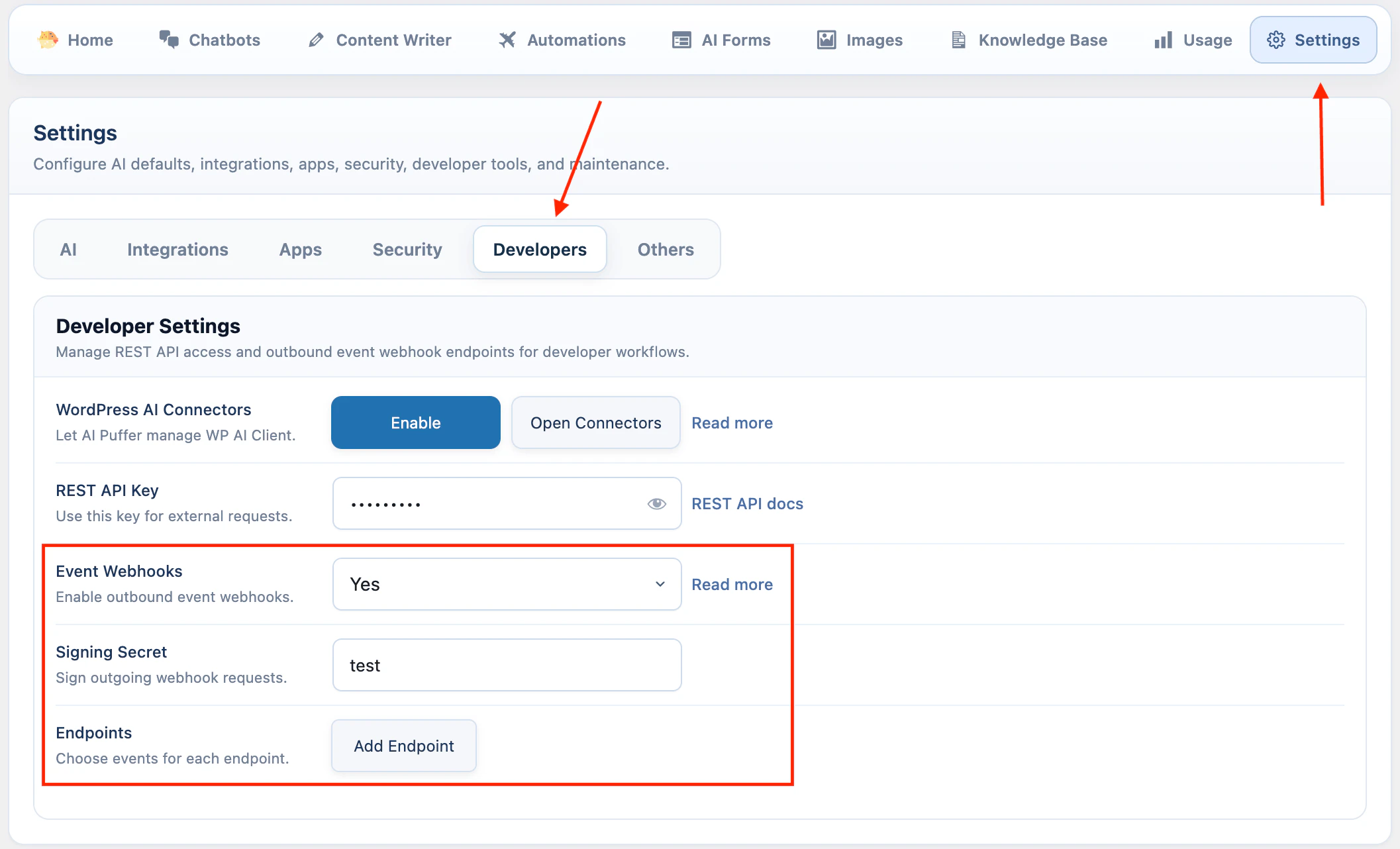
In WordPress admin, go to **AI Puffer > Settings > Developers**.
To enable event webhooks:
1. Turn on **Event Webhooks**.
2. Enter a **Signing Secret** if your receiver will verify requests.
3. Click **Add Endpoint**.
4. Enter a name and endpoint URL.
5. Turn on the endpoint.
6. Select the events this endpoint should receive.
Settings save automatically after you change them.
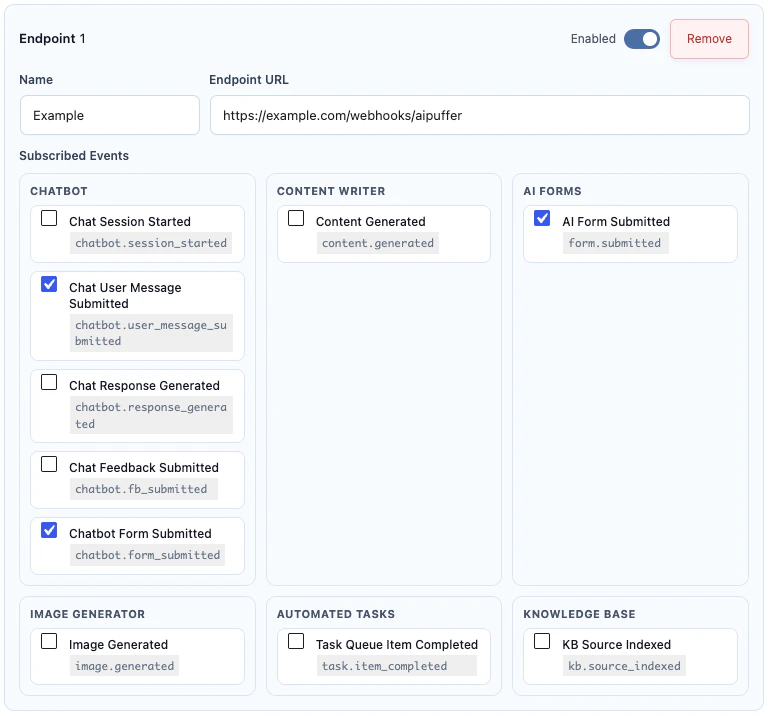 The endpoint URL must be reachable from your WordPress server. For production, use an HTTPS URL.
An endpoint receives an event only when all of these are true:
| Requirement | Meaning |
| ------------------------- | ----------------------------------------- |
| Event Webhooks is enabled | The global switch is on. |
| Endpoint is enabled | The endpoint's own switch is on. |
| Endpoint URL is set | AI Puffer has a URL to send to. |
| Event is selected | The endpoint is subscribed to that event. |
## Events
| Event | Module | Fires when |
| -------------------------------- | -------------- | ------------------------------------------------------------------- |
| `chatbot.session_started` | Chatbots | A new chatbot conversation starts. |
| `chatbot.user_message_submitted` | Chatbots | A user sends a chatbot message. |
| `chatbot.response_generated` | Chatbots | The chatbot response is completed. |
| `chatbot.fb_submitted` | Chatbots | A user submits chatbot feedback. |
| `chatbot.form_submitted` | Chatbots | A visitor submits a form displayed by a chatbot rule. |
| `content.generated` | Content Writer | Content is generated from Content Writer, streaming, or automation. |
| `task.item_completed` | Automations | An automation queue item finishes. |
| `form.submitted` | AI Forms | An AI Form submission completes and returns a response. |
| `image.generated` | Images | An image, edit, or video generation request returns output. |
| `kb.source_indexed` | Knowledge Base | A source is indexed successfully. |
Saved endpoint subscriptions using the old `chatbot.feedback_submitted` name are normalized to `chatbot.fb_submitted`.
## Payload
AI Puffer sends JSON to each subscribed endpoint.
```http theme={null}
POST /your-webhook-url HTTP/1.1
Content-Type: application/json; charset=utf-8
Accept: application/json
```
### Headers
| Header | Meaning |
| -------------------------- | ------------------------------------------------------- |
| `X-AIPKit-Event` | Event name, such as `form.submitted`. |
| `X-AIPKit-Event-Id` | Unique event envelope ID. |
| `X-AIPKit-Delivery-Id` | Unique delivery ID for this endpoint attempt group. |
| `X-AIPKit-Idempotency-Key` | Stable key for deduplicating repeated delivery. |
| `X-AIPKit-Schema-Version` | Event schema version. Current value: `2026-05-21`. |
| `X-AIPKit-Timestamp` | Unix timestamp used for the signature. |
| `X-AIPKit-Signature` | HMAC signature. Sent only when a signing secret is set. |
| `X-AIPKit-Signature-Alg` | `sha256`. Sent only when a signing secret is set. |
### Envelope
Every event uses the same outer envelope. Event-specific fields are inside `data`.
```json theme={null}
{
"id": "9b3c1fd4-9a4b-4f10-b82c-53a9f0f4a8b1",
"type": "form.submitted",
"schema_version": "2026-05-21",
"occurred_at": "2026-04-25T09:00:00+00:00",
"idempotency_key": "0b6c1e2a...",
"site": {
"url": "https://your-site.com",
"name": "Your Site"
},
"plugin": {
"slug": "gpt3-ai-content-generator",
"version": "2.4.26"
},
"source": {
"module": "ai_forms",
"origin": "frontend_submission_completed"
},
"resource": {
"type": "form_submission",
"id": "conversation-uuid",
"label": "Submission for Contact Form"
},
"data": {
"form": {
"id": 123,
"name": "Contact Form"
},
"inputs": {
"email": "person@example.com",
"message": "I need help with pricing."
},
"response": {
"text": "Thanks. Here is a short reply..."
}
},
"meta": {
"form_id": 123,
"ai_provider": "OpenAI",
"ai_model": "gpt-4o-mini"
}
}
```
`resource` and `meta` are included when the event provides them.
### Event Data
Use `type` or `X-AIPKit-Event` to decide which fields to read from `data`.
`chatbot.session_started` and `chatbot.user_message_submitted` include bot, conversation, actor, message, and AI model details.
| Field | Meaning |
| --------------------------------- | --------------------------------------- |
| `data.bot.id` | Chatbot ID. |
| `data.bot.name` | Chatbot name. |
| `data.conversation.id` | Conversation UUID. |
| `data.conversation.message_count` | Number of messages in the conversation. |
| `data.actor.type` | `user` or `guest`. |
| `data.actor.user_id` | WordPress user ID when available. |
| `data.message.text` | User message text. |
| `data.ai.provider` | Provider used by the chatbot. |
| `data.ai.model` | Model used by the chatbot. |
`chatbot.response_generated` includes `data.response.text`. `chatbot.fb_submitted` includes `data.feedback`.
`chatbot.form_submitted` is sent when a visitor submits a form displayed by a chatbot rule's **Display form** action.
| Field | Meaning |
| --------------------------------- | ---------------------------------------------------------------------------------------------------------------------------------------------- |
| `data.bot.id` | Chatbot ID. |
| `data.bot.name` | Chatbot name. |
| `data.conversation.id` | Conversation UUID. |
| `data.conversation.message_count` | Number of messages in the conversation. |
| `data.actor.type` | `user` or `guest`. |
| `data.actor.user_id` | WordPress user ID when available. |
| `data.form.id` | Rule form ID. |
| `data.form.name` | Rule form name. |
| `data.submission.id` | Submission ID. |
| `data.inputs` | Submitted form inputs, including common aliases such as `email`, `first_name`, `last_name`, `phone`, and `company` when matching fields exist. |
| `data.display_values` | Submitted values after option labels are resolved. |
| `data.labels` | Form field labels. |
| `data.summary` | Human-readable submission summary. |
| `data.page.id` | WordPress page or post ID when available. |
| `data.page.url` | Referring page URL when available. |
| `data.ai.provider` | Provider configured for the chatbot. |
| `data.ai.model` | Model configured for the chatbot. |
`content.generated` can come from Content Writer, streaming, or an automation task.
| Field | Meaning |
| ----------------------- | ------------------------------------------------ |
| `data.title` | Generated title when available. |
| `data.content` | Generated content. |
| `data.excerpt` | Excerpt when generated. |
| `data.meta_description` | SEO description when generated. |
| `data.focus_keyword` | Focus keyword when generated. |
| `data.tags` | Tags when generated. |
| `data.post.id` | Created post ID when a post was created. |
| `data.post.status` | WordPress post status. |
| `data.post.url` | WordPress post URL. |
| `data.ai.provider` | Provider used for generation. |
| `data.ai.model` | Model used for generation. |
| `data.task.id` | Automation task ID when generated by automation. |
`task.item_completed` is sent when an automation queue item completes.
| Field | Meaning |
| ----------------------------------- | ------------------------------------------------------- |
| `data.task.id` | Automation task ID. |
| `data.task.name` | Automation task name. |
| `data.task.type` | Automation task type. |
| `data.queue_item.id` | Queue item ID. |
| `data.queue_item.target_identifier` | Topic, URL, row, product, post, or other queued target. |
| `data.queue_item.status` | Final queue status. |
| `data.queue_item.attempts` | Number of attempts. |
| `data.result.message` | Result message. |
| `data.result.generated_post_id` | Generated post ID when available. |
| `data.ai.provider` | Provider used by the queue item when available. |
| `data.ai.model` | Model used by the queue item when available. |
`form.submitted` is sent after an AI Form returns a response.
| Field | Meaning |
| ----------------------- | --------------------------------- |
| `data.form.id` | AI Form ID. |
| `data.form.name` | AI Form name. |
| `data.submission.id` | Submission ID. |
| `data.submission.count` | Submission count. |
| `data.inputs` | Submitted form inputs. |
| `data.response.text` | AI response. |
| `data.ai.provider` | Provider used by the form. |
| `data.ai.model` | Model used by the form. |
| `data.actor.type` | `user` or `guest`. |
| `data.actor.user_id` | WordPress user ID when available. |
`image.generated` is sent after image, image edit, or video generation returns output.
| Field | Meaning |
| --------------------- | -------------------------------------------------------------------------------------------------------------------------------- |
| `data.prompt` | Prompt used for generation. |
| `data.provider` | Image or video provider, for example `xAI`. |
| `data.model` | Model used for generation. |
| `data.mode` | Generation mode. |
| `data.media_type` | `image` or `video`. |
| `data.output_count` | Number of generated outputs. |
| `data.outputs.images` | Image output data. |
| `data.outputs.videos` | Video output data. |
| `data.usage` | Usage details when returned by the provider. xAI image responses can include `cost_in_usd_ticks` inside provider usage metadata. |
| `data.actor.type` | `user` or `guest`. |
`kb.source_indexed` is sent after a Knowledge Base source is indexed successfully.
| Field | Meaning |
| ------------------------- | -------------------------------------------- |
| `data.source.log_id` | Knowledge source log ID. |
| `data.source.post_id` | WordPress post ID when the source is a post. |
| `data.source.post_title` | Source title. |
| `data.source.post_url` | Source URL when available. |
| `data.provider` | Vector provider. |
| `data.store.id` | Vector store, index, or collection ID. |
| `data.store.name` | Vector store, index, or collection name. |
| `data.status` | Indexing status. |
| `data.message` | Indexing message. |
| `data.embedding.provider` | Embedding provider. |
| `data.embedding.model` | Embedding model. |
## Signatures
If a signing secret is set, AI Puffer signs the raw JSON body.
Signature base string:
```text theme={null}
{X-AIPKit-Timestamp}.{raw_request_body}
```
Signature algorithm:
```text theme={null}
HMAC-SHA256
```
Header format:
```text theme={null}
X-AIPKit-Signature: sha256=HEX_DIGEST
```
Verify the raw request body exactly as received. Do not parse JSON and then stringify it again before checking the signature.
Node example:
```js theme={null}
import crypto from "node:crypto";
function verifyAIPufferWebhook({ rawBody, timestamp, signature, secret }) {
const expected =
"sha256=" +
crypto
.createHmac("sha256", secret)
.update(`${timestamp}.${rawBody}`)
.digest("hex");
const a = Buffer.from(signature);
const b = Buffer.from(expected);
if (a.length !== b.length) {
return false;
}
return crypto.timingSafeEqual(a, b);
}
```
## Delivery
Return any `2xx` status code to mark the delivery as successful.
```json theme={null}
{
"received": true
}
```
AI Puffer treats network errors and non-`2xx` responses as failed deliveries. Retryable failures include network errors, `408`, `409`, `425`, `429`, and `5xx` responses.
Default delivery behavior:
| Setting | Default |
| ----------------------- | ------------------------------------------ |
| Request timeout | `5` seconds |
| Redirects | `2` |
| Retry schedule | Immediate, `0.25` seconds, then `1` second |
| Queue worker batch size | `5` jobs |
| Cron fallback | Every 5 minutes |
| Failed queue retention | `7` days |
AI Puffer queues latency-sensitive frontend events so slow endpoints do not slow down the visitor request. This includes chatbot events, `form.submitted`, `content.generated`, and `image.generated` when they are not manual or admin-originated.
Some admin and manual events can be delivered synchronously.
Webhook receivers should be idempotent. Store `X-AIPKit-Idempotency-Key` or `X-AIPKit-Event-Id` and ignore duplicates that were already processed.
### Delivery Issues
Failed queued webhook deliveries appear in **AI Puffer > Settings > Developers**.
The panel shows the five most recent failed webhook jobs. Use **Retry** to run the delivery again, or **Clear** to remove it from the list.
The endpoint URL must be reachable from your WordPress server. For production, use an HTTPS URL.
An endpoint receives an event only when all of these are true:
| Requirement | Meaning |
| ------------------------- | ----------------------------------------- |
| Event Webhooks is enabled | The global switch is on. |
| Endpoint is enabled | The endpoint's own switch is on. |
| Endpoint URL is set | AI Puffer has a URL to send to. |
| Event is selected | The endpoint is subscribed to that event. |
## Events
| Event | Module | Fires when |
| -------------------------------- | -------------- | ------------------------------------------------------------------- |
| `chatbot.session_started` | Chatbots | A new chatbot conversation starts. |
| `chatbot.user_message_submitted` | Chatbots | A user sends a chatbot message. |
| `chatbot.response_generated` | Chatbots | The chatbot response is completed. |
| `chatbot.fb_submitted` | Chatbots | A user submits chatbot feedback. |
| `chatbot.form_submitted` | Chatbots | A visitor submits a form displayed by a chatbot rule. |
| `content.generated` | Content Writer | Content is generated from Content Writer, streaming, or automation. |
| `task.item_completed` | Automations | An automation queue item finishes. |
| `form.submitted` | AI Forms | An AI Form submission completes and returns a response. |
| `image.generated` | Images | An image, edit, or video generation request returns output. |
| `kb.source_indexed` | Knowledge Base | A source is indexed successfully. |
Saved endpoint subscriptions using the old `chatbot.feedback_submitted` name are normalized to `chatbot.fb_submitted`.
## Payload
AI Puffer sends JSON to each subscribed endpoint.
```http theme={null}
POST /your-webhook-url HTTP/1.1
Content-Type: application/json; charset=utf-8
Accept: application/json
```
### Headers
| Header | Meaning |
| -------------------------- | ------------------------------------------------------- |
| `X-AIPKit-Event` | Event name, such as `form.submitted`. |
| `X-AIPKit-Event-Id` | Unique event envelope ID. |
| `X-AIPKit-Delivery-Id` | Unique delivery ID for this endpoint attempt group. |
| `X-AIPKit-Idempotency-Key` | Stable key for deduplicating repeated delivery. |
| `X-AIPKit-Schema-Version` | Event schema version. Current value: `2026-05-21`. |
| `X-AIPKit-Timestamp` | Unix timestamp used for the signature. |
| `X-AIPKit-Signature` | HMAC signature. Sent only when a signing secret is set. |
| `X-AIPKit-Signature-Alg` | `sha256`. Sent only when a signing secret is set. |
### Envelope
Every event uses the same outer envelope. Event-specific fields are inside `data`.
```json theme={null}
{
"id": "9b3c1fd4-9a4b-4f10-b82c-53a9f0f4a8b1",
"type": "form.submitted",
"schema_version": "2026-05-21",
"occurred_at": "2026-04-25T09:00:00+00:00",
"idempotency_key": "0b6c1e2a...",
"site": {
"url": "https://your-site.com",
"name": "Your Site"
},
"plugin": {
"slug": "gpt3-ai-content-generator",
"version": "2.4.26"
},
"source": {
"module": "ai_forms",
"origin": "frontend_submission_completed"
},
"resource": {
"type": "form_submission",
"id": "conversation-uuid",
"label": "Submission for Contact Form"
},
"data": {
"form": {
"id": 123,
"name": "Contact Form"
},
"inputs": {
"email": "person@example.com",
"message": "I need help with pricing."
},
"response": {
"text": "Thanks. Here is a short reply..."
}
},
"meta": {
"form_id": 123,
"ai_provider": "OpenAI",
"ai_model": "gpt-4o-mini"
}
}
```
`resource` and `meta` are included when the event provides them.
### Event Data
Use `type` or `X-AIPKit-Event` to decide which fields to read from `data`.
`chatbot.session_started` and `chatbot.user_message_submitted` include bot, conversation, actor, message, and AI model details.
| Field | Meaning |
| --------------------------------- | --------------------------------------- |
| `data.bot.id` | Chatbot ID. |
| `data.bot.name` | Chatbot name. |
| `data.conversation.id` | Conversation UUID. |
| `data.conversation.message_count` | Number of messages in the conversation. |
| `data.actor.type` | `user` or `guest`. |
| `data.actor.user_id` | WordPress user ID when available. |
| `data.message.text` | User message text. |
| `data.ai.provider` | Provider used by the chatbot. |
| `data.ai.model` | Model used by the chatbot. |
`chatbot.response_generated` includes `data.response.text`. `chatbot.fb_submitted` includes `data.feedback`.
`chatbot.form_submitted` is sent when a visitor submits a form displayed by a chatbot rule's **Display form** action.
| Field | Meaning |
| --------------------------------- | ---------------------------------------------------------------------------------------------------------------------------------------------- |
| `data.bot.id` | Chatbot ID. |
| `data.bot.name` | Chatbot name. |
| `data.conversation.id` | Conversation UUID. |
| `data.conversation.message_count` | Number of messages in the conversation. |
| `data.actor.type` | `user` or `guest`. |
| `data.actor.user_id` | WordPress user ID when available. |
| `data.form.id` | Rule form ID. |
| `data.form.name` | Rule form name. |
| `data.submission.id` | Submission ID. |
| `data.inputs` | Submitted form inputs, including common aliases such as `email`, `first_name`, `last_name`, `phone`, and `company` when matching fields exist. |
| `data.display_values` | Submitted values after option labels are resolved. |
| `data.labels` | Form field labels. |
| `data.summary` | Human-readable submission summary. |
| `data.page.id` | WordPress page or post ID when available. |
| `data.page.url` | Referring page URL when available. |
| `data.ai.provider` | Provider configured for the chatbot. |
| `data.ai.model` | Model configured for the chatbot. |
`content.generated` can come from Content Writer, streaming, or an automation task.
| Field | Meaning |
| ----------------------- | ------------------------------------------------ |
| `data.title` | Generated title when available. |
| `data.content` | Generated content. |
| `data.excerpt` | Excerpt when generated. |
| `data.meta_description` | SEO description when generated. |
| `data.focus_keyword` | Focus keyword when generated. |
| `data.tags` | Tags when generated. |
| `data.post.id` | Created post ID when a post was created. |
| `data.post.status` | WordPress post status. |
| `data.post.url` | WordPress post URL. |
| `data.ai.provider` | Provider used for generation. |
| `data.ai.model` | Model used for generation. |
| `data.task.id` | Automation task ID when generated by automation. |
`task.item_completed` is sent when an automation queue item completes.
| Field | Meaning |
| ----------------------------------- | ------------------------------------------------------- |
| `data.task.id` | Automation task ID. |
| `data.task.name` | Automation task name. |
| `data.task.type` | Automation task type. |
| `data.queue_item.id` | Queue item ID. |
| `data.queue_item.target_identifier` | Topic, URL, row, product, post, or other queued target. |
| `data.queue_item.status` | Final queue status. |
| `data.queue_item.attempts` | Number of attempts. |
| `data.result.message` | Result message. |
| `data.result.generated_post_id` | Generated post ID when available. |
| `data.ai.provider` | Provider used by the queue item when available. |
| `data.ai.model` | Model used by the queue item when available. |
`form.submitted` is sent after an AI Form returns a response.
| Field | Meaning |
| ----------------------- | --------------------------------- |
| `data.form.id` | AI Form ID. |
| `data.form.name` | AI Form name. |
| `data.submission.id` | Submission ID. |
| `data.submission.count` | Submission count. |
| `data.inputs` | Submitted form inputs. |
| `data.response.text` | AI response. |
| `data.ai.provider` | Provider used by the form. |
| `data.ai.model` | Model used by the form. |
| `data.actor.type` | `user` or `guest`. |
| `data.actor.user_id` | WordPress user ID when available. |
`image.generated` is sent after image, image edit, or video generation returns output.
| Field | Meaning |
| --------------------- | -------------------------------------------------------------------------------------------------------------------------------- |
| `data.prompt` | Prompt used for generation. |
| `data.provider` | Image or video provider, for example `xAI`. |
| `data.model` | Model used for generation. |
| `data.mode` | Generation mode. |
| `data.media_type` | `image` or `video`. |
| `data.output_count` | Number of generated outputs. |
| `data.outputs.images` | Image output data. |
| `data.outputs.videos` | Video output data. |
| `data.usage` | Usage details when returned by the provider. xAI image responses can include `cost_in_usd_ticks` inside provider usage metadata. |
| `data.actor.type` | `user` or `guest`. |
`kb.source_indexed` is sent after a Knowledge Base source is indexed successfully.
| Field | Meaning |
| ------------------------- | -------------------------------------------- |
| `data.source.log_id` | Knowledge source log ID. |
| `data.source.post_id` | WordPress post ID when the source is a post. |
| `data.source.post_title` | Source title. |
| `data.source.post_url` | Source URL when available. |
| `data.provider` | Vector provider. |
| `data.store.id` | Vector store, index, or collection ID. |
| `data.store.name` | Vector store, index, or collection name. |
| `data.status` | Indexing status. |
| `data.message` | Indexing message. |
| `data.embedding.provider` | Embedding provider. |
| `data.embedding.model` | Embedding model. |
## Signatures
If a signing secret is set, AI Puffer signs the raw JSON body.
Signature base string:
```text theme={null}
{X-AIPKit-Timestamp}.{raw_request_body}
```
Signature algorithm:
```text theme={null}
HMAC-SHA256
```
Header format:
```text theme={null}
X-AIPKit-Signature: sha256=HEX_DIGEST
```
Verify the raw request body exactly as received. Do not parse JSON and then stringify it again before checking the signature.
Node example:
```js theme={null}
import crypto from "node:crypto";
function verifyAIPufferWebhook({ rawBody, timestamp, signature, secret }) {
const expected =
"sha256=" +
crypto
.createHmac("sha256", secret)
.update(`${timestamp}.${rawBody}`)
.digest("hex");
const a = Buffer.from(signature);
const b = Buffer.from(expected);
if (a.length !== b.length) {
return false;
}
return crypto.timingSafeEqual(a, b);
}
```
## Delivery
Return any `2xx` status code to mark the delivery as successful.
```json theme={null}
{
"received": true
}
```
AI Puffer treats network errors and non-`2xx` responses as failed deliveries. Retryable failures include network errors, `408`, `409`, `425`, `429`, and `5xx` responses.
Default delivery behavior:
| Setting | Default |
| ----------------------- | ------------------------------------------ |
| Request timeout | `5` seconds |
| Redirects | `2` |
| Retry schedule | Immediate, `0.25` seconds, then `1` second |
| Queue worker batch size | `5` jobs |
| Cron fallback | Every 5 minutes |
| Failed queue retention | `7` days |
AI Puffer queues latency-sensitive frontend events so slow endpoints do not slow down the visitor request. This includes chatbot events, `form.submitted`, `content.generated`, and `image.generated` when they are not manual or admin-originated.
Some admin and manual events can be delivered synchronously.
Webhook receivers should be idempotent. Store `X-AIPKit-Idempotency-Key` or `X-AIPKit-Event-Id` and ignore duplicates that were already processed.
### Delivery Issues
Failed queued webhook deliveries appear in **AI Puffer > Settings > Developers**.
The panel shows the five most recent failed webhook jobs. Use **Retry** to run the delivery again, or **Clear** to remove it from the list.
 ### Test an Endpoint
Use a temporary endpoint during setup.
1. Create a test URL in RequestBin, webhook.site, or a local tunnel.
2. Add the URL as an AI Puffer webhook endpoint.
3. Subscribe it to one event, such as `form.submitted`.
4. Trigger that event in WordPress.
5. Check the received headers and JSON body.
6. Replace the test URL with your production URL.
## Troubleshooting
Check these first:
1. **Event Webhooks** is enabled.
2. The endpoint is enabled.
3. The endpoint URL is correct and reachable from the WordPress server.
4. The endpoint is subscribed to the event you triggered.
5. Your server or firewall is not blocking outbound HTTP requests.
Each endpoint has its own event subscriptions. Edit the endpoint and confirm every expected event is selected.
Verify against the raw request body and `X-AIPKit-Timestamp`.
Common causes:
* The receiver parses and re-stringifies JSON before verification.
* The wrong signing secret is used.
* The receiver includes a different timestamp in the base string.
* The receiver strips or changes the raw body before verification.
Return a quick `2xx` response first, then do longer work in your own queue. AI Puffer waits up to 5 seconds for the endpoint response by default.
Retries can send the same event again. Deduplicate with `X-AIPKit-Idempotency-Key` or `X-AIPKit-Event-Id`.
Open **AI Puffer > Settings > Developers**. Use **Retry** if the endpoint is fixed. Use **Clear** if you no longer need that failed job.
## WordPress Hooks
Use these hooks for custom integrations.
| Hook | Type | Use |
| ------------------------------------------------ | ------ | -------------------------------------------- |
| `aipkit_event_webhooks_envelope` | Filter | Modify the envelope before delivery. |
| `aipkit_event_webhooks_targets` | Filter | Modify endpoint targets for an event. |
| `aipkit_event_webhooks_request_headers` | Filter | Add or modify outgoing request headers. |
| `aipkit_event_webhooks_request_args` | Filter | Modify `wp_remote_post` arguments. |
| `aipkit_event_webhooks_should_retry` | Filter | Change retry behavior for failed attempts. |
| `aipkit_event_webhooks_retry_delays` | Filter | Change retry delays. |
| `aipkit_event_delivery_queue_async_enabled` | Filter | Change whether an event uses async delivery. |
| `aipkit_event_delivery_queue_processing_enabled` | Filter | Enable or disable queue processing. |
| `aipkit_event_webhooks_emitted` | Action | Run code after an event is emitted. |
| `aipkit_event_webhooks_delivery_completed` | Action | Run code after a delivery succeeds. |
| `aipkit_event_webhooks_delivery_failed` | Action | Run code after a delivery fails. |
### Test an Endpoint
Use a temporary endpoint during setup.
1. Create a test URL in RequestBin, webhook.site, or a local tunnel.
2. Add the URL as an AI Puffer webhook endpoint.
3. Subscribe it to one event, such as `form.submitted`.
4. Trigger that event in WordPress.
5. Check the received headers and JSON body.
6. Replace the test URL with your production URL.
## Troubleshooting
Check these first:
1. **Event Webhooks** is enabled.
2. The endpoint is enabled.
3. The endpoint URL is correct and reachable from the WordPress server.
4. The endpoint is subscribed to the event you triggered.
5. Your server or firewall is not blocking outbound HTTP requests.
Each endpoint has its own event subscriptions. Edit the endpoint and confirm every expected event is selected.
Verify against the raw request body and `X-AIPKit-Timestamp`.
Common causes:
* The receiver parses and re-stringifies JSON before verification.
* The wrong signing secret is used.
* The receiver includes a different timestamp in the base string.
* The receiver strips or changes the raw body before verification.
Return a quick `2xx` response first, then do longer work in your own queue. AI Puffer waits up to 5 seconds for the endpoint response by default.
Retries can send the same event again. Deduplicate with `X-AIPKit-Idempotency-Key` or `X-AIPKit-Event-Id`.
Open **AI Puffer > Settings > Developers**. Use **Retry** if the endpoint is fixed. Use **Clear** if you no longer need that failed job.
## WordPress Hooks
Use these hooks for custom integrations.
| Hook | Type | Use |
| ------------------------------------------------ | ------ | -------------------------------------------- |
| `aipkit_event_webhooks_envelope` | Filter | Modify the envelope before delivery. |
| `aipkit_event_webhooks_targets` | Filter | Modify endpoint targets for an event. |
| `aipkit_event_webhooks_request_headers` | Filter | Add or modify outgoing request headers. |
| `aipkit_event_webhooks_request_args` | Filter | Modify `wp_remote_post` arguments. |
| `aipkit_event_webhooks_should_retry` | Filter | Change retry behavior for failed attempts. |
| `aipkit_event_webhooks_retry_delays` | Filter | Change retry delays. |
| `aipkit_event_delivery_queue_async_enabled` | Filter | Change whether an event uses async delivery. |
| `aipkit_event_delivery_queue_processing_enabled` | Filter | Enable or disable queue processing. |
| `aipkit_event_webhooks_emitted` | Action | Run code after an event is emitted. |
| `aipkit_event_webhooks_delivery_completed` | Action | Run code after a delivery succeeds. |
| `aipkit_event_webhooks_delivery_failed` | Action | Run code after a delivery fails. |