Authentication
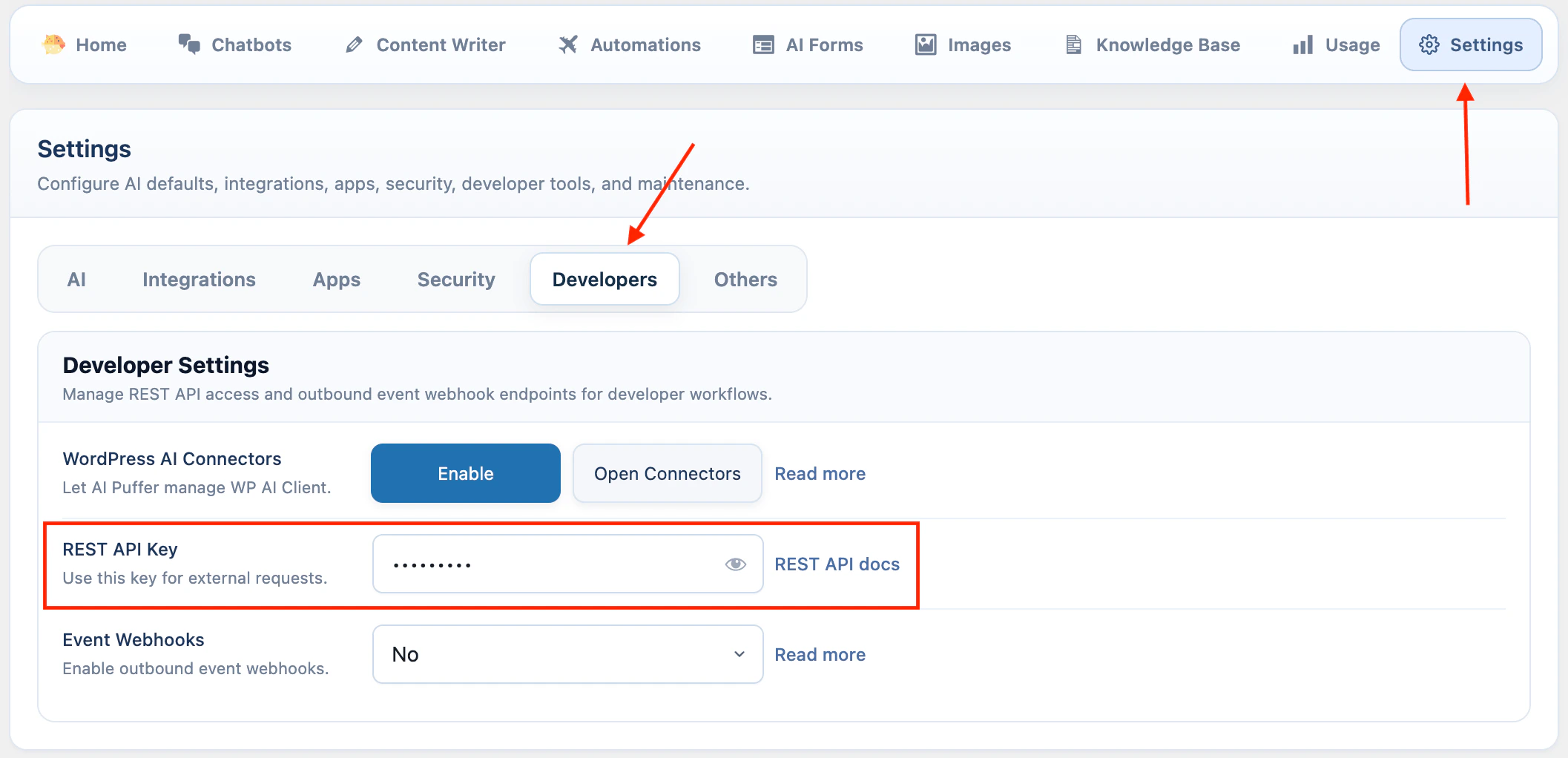
Most endpoints require the AI Puffer REST API key.- Open WordPress Admin > AI Puffer > Settings.
- Open Developers.
- Enter a value in REST API Key.
- Wait for the setting to save.
Send the key in a header
Use anAuthorization header when possible.
Send the key as a request parameter
You can also send the key asaipkit_api_key.
Endpoints
| Endpoint | Method | Use |
|---|---|---|
/generate | POST | Generate text with a configured AI provider. |
/images/generate | POST | Generate images. |
/embeddings | POST | Create embeddings from text. |
/chat/{bot_id}/message | POST | Send a message to a chatbot. |
/logs | GET | Read saved chat logs. |
/vector-stores/upsert | POST | Embed text and upsert it into Pinecone or Qdrant. |
/chatbots/{bot_id}/embed-config | GET | Read the embed config and HTML for an external chatbot widget. |
Text generation
Generate a text response with one of the configured text providers.Parameters
| Parameter | Type | Required | Notes |
|---|---|---|---|
provider | string | Yes | openai, azure, google, openrouter, claude, deepseek, or ollama. |
model | string | Yes | Model ID or Azure deployment ID. |
messages | array | Yes | Chat-style messages with role and content. Roles: system, user, assistant. |
system_instruction | string | No | Extra instruction text. Supports [date] and [username]. |
ai_params | object | No | Overrides for AI parameters such as temperature or max_completion_tokens. |
stream | boolean | No | This endpoint does not support streaming. Leave it as false. |
Request
Response
Image generation
Generate images from a text prompt.Parameters
| Parameter | Type | Required | Notes |
|---|---|---|---|
prompt | string | Yes | Text prompt for the image. |
provider | string | No | openai, azure, or google. Default: openai. |
model | string | No | Image model ID. Uses plugin settings if omitted. |
n | integer | No | Number of images. Minimum 1, maximum 10. Default: 1. |
size | string | No | Supported values include 1024x1024, 1792x1024, 1024x1792, 1536x1024, 1024x1536, 1024x768, and 768x1024. |
quality | string | No | standard or hd, when supported by the selected model. |
style | string | No | vivid or natural, when supported by the selected model. |
response_format | string | No | url or b64_json. Default: url. |
Request
Response
Embeddings
Create embeddings from one string or an array of strings.Parameters
| Parameter | Type | Required | Notes |
|---|---|---|---|
provider | string | Yes | openai, google, azure, or openrouter. |
model | string | Yes | Embedding model ID or Azure deployment ID. |
input | string or array | Yes | Text to embed. |
dimensions | integer | No | OpenAI, OpenRouter, or Azure output dimensions when supported. |
encoding_format | string | No | OpenAI or OpenRouter format: float or base64. Default: float. |
task_type | string | No | Google embedding task type. |
output_dimensionality | integer | No | Google embedding output dimension size. |
user | string | No | End-user identifier for OpenAI or Azure monitoring. |
task_type values:
Request
Response
Chat message
Send a message to one chatbot. The chatbot must exist in WordPress. The request uses the chatbot settings saved in AI Puffer.Parameters
| Parameter | Type | Required | Notes |
|---|---|---|---|
bot_id | integer | Yes | Chatbot ID in the URL. |
messages | array | Yes | Conversation history. Roles: user and assistant. The last message must be from user. |
Request
Response
Chat logs
Read saved chatbot conversation logs.Parameters
| Parameter | Type | Required | Notes |
|---|---|---|---|
page | integer | No | Page number. Default: 1. |
per_page | integer | No | Logs per page. Default: 20, maximum: 100. |
bot_id | integer | No | Filter by chatbot ID. |
user_search | string | No | Search display name, username, or email. |
message_search | string | No | Search conversation content. |
| Header | Meaning |
|---|---|
X-WP-Total | Total matching logs. |
X-WP-TotalPages | Total pages. |
Request
Response
Vector store upsert
Embed text and add the vectors to Pinecone or Qdrant. The target index or collection must already exist. AI Puffer creates embeddings, then sends vectors to the selected vector database.Parameters
| Parameter | Type | Required | Notes |
|---|---|---|---|
provider | string | Yes | pinecone or qdrant. |
target_id | string | Yes | Pinecone index name or Qdrant collection name. |
vectors | array | Yes | Objects with content. Optional id and metadata. |
embedding_provider | string | Yes | openai, google, azure, or openrouter. |
embedding_model | string | Yes | Embedding model ID or Azure deployment ID. |
namespace | string | No | Pinecone namespace. Ignored by Qdrant. |
vectors item must include:
| Field | Type | Required | Notes |
|---|---|---|---|
content | string | Yes | Text to embed and store. |
id | string | No | Vector ID. AI Puffer generates one if omitted. |
metadata | object | No | Extra metadata. AI Puffer also stores the original content in metadata. |
Request
Response
Chatbot embed config
Read the config and rendered HTML for an externally embedded chatbot. This endpoint is not authenticated with the REST API key. Access is controlled by the chatbot’s embed settings and allowed domains.Parameters
| Parameter | Type | Required | Notes |
|---|---|---|---|
bot_id | integer | Yes | Chatbot ID in the URL. |
Response
403.