Event webhooks send an HTTP POST request when selected AI Puffer events happen. Use them when another system needs to receive form submissions, chatbot activity, generated content, image outputs, automation results, or knowledge base indexing results.

Setup

Enable webhooks, add endpoints, and choose events.

Events

See the event names and when they fire.

Payload

Read the request headers and JSON body format.

Signatures

Verify requests with the signing secret.

Delivery

Understand success responses, retries, and failed deliveries.

Troubleshooting

Fix missing requests, signature errors, and timeouts.

Setup

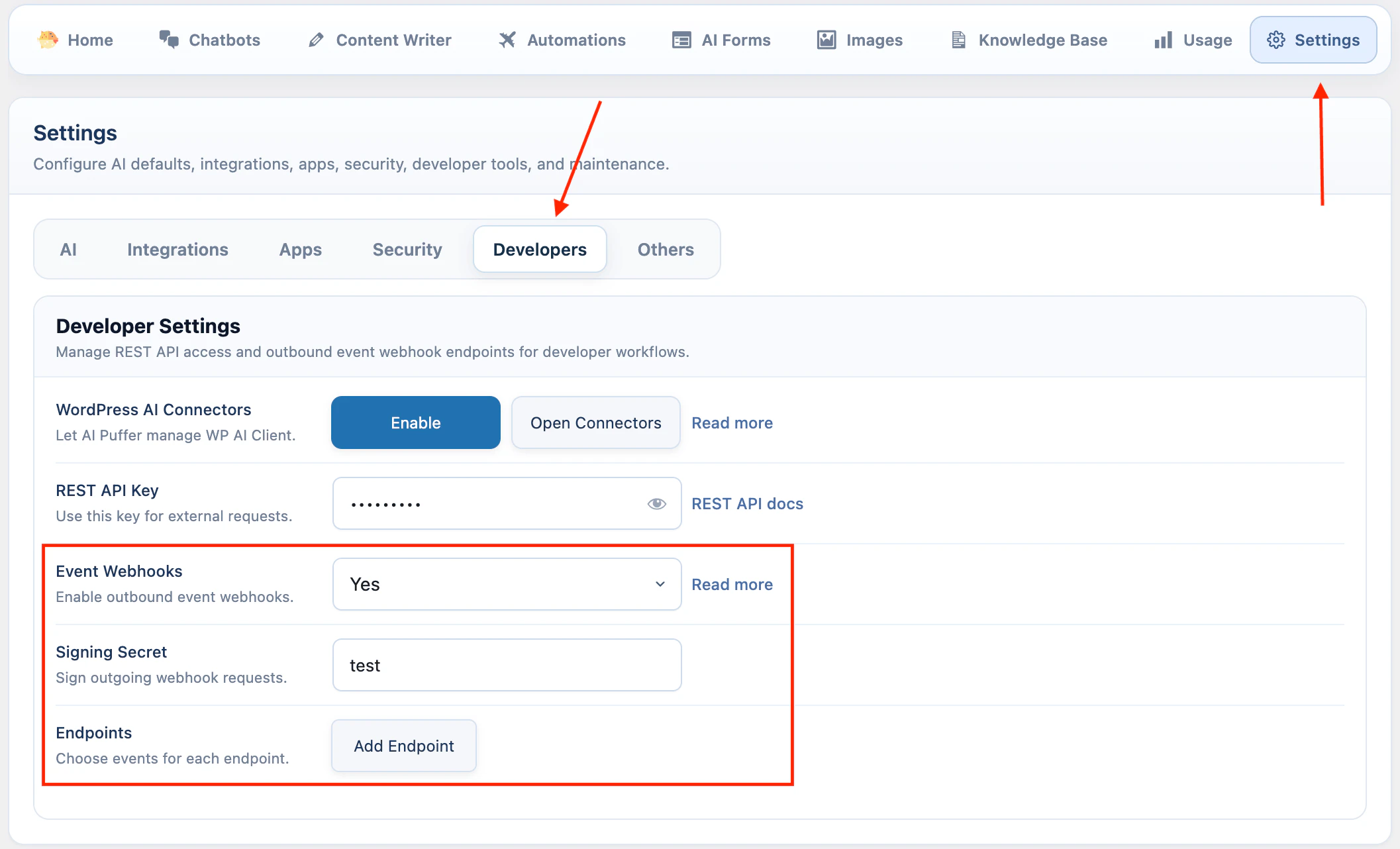
In WordPress admin, go to AI Puffer > Settings > Developers. To enable event webhooks:
  1. Turn on Event Webhooks.
  2. Enter a Signing Secret if your receiver will verify requests.
  3. Click Add Endpoint.
  4. Enter a name and endpoint URL.
  5. Turn on the endpoint.
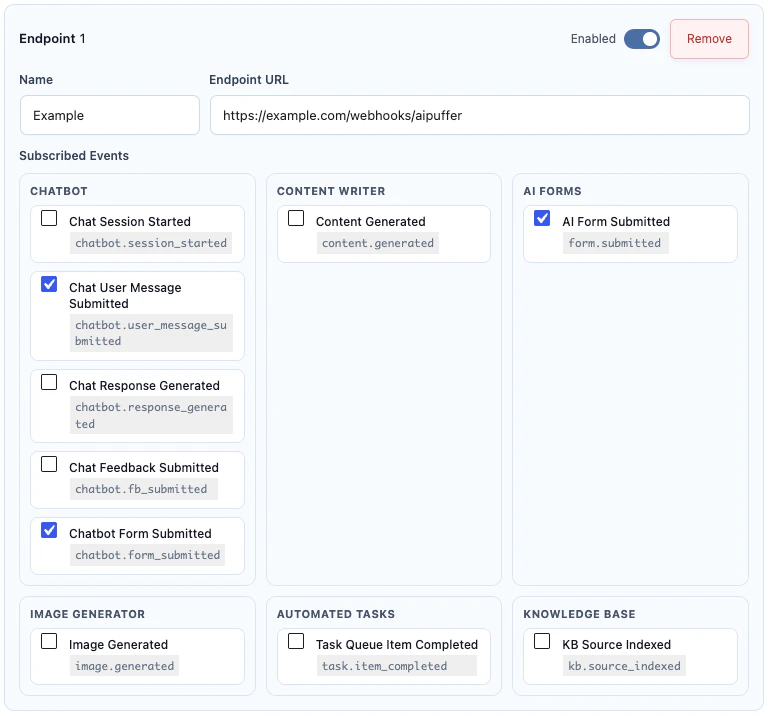
  6. Select the events this endpoint should receive.
Settings save automatically after you change them.
Developer Settings with Event Webhooks enabled
Webhook endpoint with subscribed events
The endpoint URL must be reachable from your WordPress server. For production, use an HTTPS URL.
An endpoint receives an event only when all of these are true:
RequirementMeaning
Event Webhooks is enabledThe global switch is on.
Endpoint is enabledThe endpoint’s own switch is on.
Endpoint URL is setAI Puffer has a URL to send to.
Event is selectedThe endpoint is subscribed to that event.

Events

EventModuleFires when
chatbot.session_startedChatbotsA new chatbot conversation starts.
chatbot.user_message_submittedChatbotsA user sends a chatbot message.
chatbot.response_generatedChatbotsThe chatbot response is completed.
chatbot.fb_submittedChatbotsA user submits chatbot feedback.
content.generatedContent WriterContent is generated from Content Writer, streaming, or automation.
task.item_completedAutomationsAn automation queue item finishes.
form.submittedAI FormsAn AI Form submission completes and returns a response.
image.generatedImagesAn image, edit, or video generation request returns output.
kb.source_indexedKnowledge BaseA source is indexed successfully.
Saved endpoint subscriptions using the old chatbot.feedback_submitted name are normalized to chatbot.fb_submitted.

Payload

AI Puffer sends JSON to each subscribed endpoint.
POST /your-webhook-url HTTP/1.1
Content-Type: application/json; charset=utf-8
Accept: application/json

Headers

HeaderMeaning
X-AIPKit-EventEvent name, such as form.submitted.
X-AIPKit-Event-IdUnique event envelope ID.
X-AIPKit-Delivery-IdUnique delivery ID for this endpoint attempt group.
X-AIPKit-Idempotency-KeyStable key for deduplicating repeated delivery.
X-AIPKit-Schema-VersionEvent schema version. Current value: 2026-03-19.
X-AIPKit-TimestampUnix timestamp used for the signature.
X-AIPKit-SignatureHMAC signature. Sent only when a signing secret is set.
X-AIPKit-Signature-Algsha256. Sent only when a signing secret is set.

Envelope

Every event uses the same outer envelope. Event-specific fields are inside data.
{
  "id": "9b3c1fd4-9a4b-4f10-b82c-53a9f0f4a8b1",
  "type": "form.submitted",
  "schema_version": "2026-03-19",
  "occurred_at": "2026-04-25T09:00:00+00:00",
  "idempotency_key": "0b6c1e2a...",
  "site": {
    "url": "https://your-site.com",
    "name": "Your Site"
  },
  "plugin": {
    "slug": "gpt3-ai-content-generator",
    "version": "2.4.8"
  },
  "source": {
    "module": "ai_forms",
    "origin": "frontend_submission_completed"
  },
  "resource": {
    "type": "form_submission",
    "id": "conversation-uuid",
    "label": "Submission for Contact Form"
  },
  "data": {
    "form": {
      "id": 123,
      "name": "Contact Form"
    },
    "inputs": {
      "email": "person@example.com",
      "message": "I need help with pricing."
    },
    "response": {
      "text": "Thanks. Here is a short reply..."
    }
  },
  "meta": {
    "form_id": 123,
    "ai_provider": "OpenAI",
    "ai_model": "gpt-4o-mini"
  }
}
resource and meta are included when the event provides them.

Event Data

Use type or X-AIPKit-Event to decide which fields to read from data.
chatbot.session_started and chatbot.user_message_submitted include bot, conversation, actor, message, and AI model details.
FieldMeaning
data.bot.idChatbot ID.
data.bot.nameChatbot name.
data.conversation.idConversation UUID.
data.conversation.message_countNumber of messages in the conversation.
data.actor.typeuser or guest.
data.actor.user_idWordPress user ID when available.
data.message.textUser message text.
data.ai.providerProvider used by the chatbot.
data.ai.modelModel used by the chatbot.
chatbot.response_generated includes data.response.text. chatbot.fb_submitted includes data.feedback.
content.generated can come from Content Writer, streaming, or an automation task.
FieldMeaning
data.titleGenerated title when available.
data.contentGenerated content.
data.excerptExcerpt when generated.
data.meta_descriptionSEO description when generated.
data.focus_keywordFocus keyword when generated.
data.tagsTags when generated.
data.post.idCreated post ID when a post was created.
data.post.statusWordPress post status.
data.post.urlWordPress post URL.
data.ai.providerProvider used for generation.
data.ai.modelModel used for generation.
data.task.idAutomation task ID when generated by automation.
task.item_completed is sent when an automation queue item completes.
FieldMeaning
data.task.idAutomation task ID.
data.task.nameAutomation task name.
data.task.typeAutomation task type.
data.queue_item.idQueue item ID.
data.queue_item.target_identifierTopic, URL, row, product, post, or other queued target.
data.queue_item.statusFinal queue status.
data.queue_item.attemptsNumber of attempts.
data.result.messageResult message.
data.result.generated_post_idGenerated post ID when available.
form.submitted is sent after an AI Form returns a response.
FieldMeaning
data.form.idAI Form ID.
data.form.nameAI Form name.
data.submission.idSubmission ID.
data.submission.countSubmission count.
data.inputsSubmitted form inputs.
data.response.textAI response.
data.ai.providerProvider used by the form.
data.ai.modelModel used by the form.
data.actor.typeuser or guest.
data.actor.user_idWordPress user ID when available.
image.generated is sent after image, image edit, or video generation returns output.
FieldMeaning
data.promptPrompt used for generation.
data.providerImage or video provider.
data.modelModel used for generation.
data.modeGeneration mode.
data.media_typeimage or video.
data.output_countNumber of generated outputs.
data.outputs.imagesImage output data.
data.outputs.videosVideo output data.
data.usageUsage details when returned by the provider.
data.actor.typeuser or guest.
kb.source_indexed is sent after a Knowledge Base source is indexed successfully.
FieldMeaning
data.source.log_idKnowledge source log ID.
data.source.post_idWordPress post ID when the source is a post.
data.source.post_titleSource title.
data.source.post_urlSource URL when available.
data.providerVector provider.
data.store.idVector store, index, or collection ID.
data.store.nameVector store, index, or collection name.
data.statusIndexing status.
data.messageIndexing message.
data.embedding.providerEmbedding provider.
data.embedding.modelEmbedding model.

Signatures

If a signing secret is set, AI Puffer signs the raw JSON body. Signature base string:
{X-AIPKit-Timestamp}.{raw_request_body}
Signature algorithm:
HMAC-SHA256
Header format:
X-AIPKit-Signature: sha256=HEX_DIGEST
Verify the raw request body exactly as received. Do not parse JSON and then stringify it again before checking the signature.
Node example:
import crypto from "node:crypto";

function verifyAIPufferWebhook({ rawBody, timestamp, signature, secret }) {
  const expected =
    "sha256=" +
    crypto
      .createHmac("sha256", secret)
      .update(`${timestamp}.${rawBody}`)
      .digest("hex");

  const a = Buffer.from(signature);
  const b = Buffer.from(expected);

  if (a.length !== b.length) {
    return false;
  }

  return crypto.timingSafeEqual(a, b);
}

Delivery

Return any 2xx status code to mark the delivery as successful.
{
  "received": true
}
AI Puffer treats network errors and non-2xx responses as failed deliveries. Retryable failures include network errors, 408, 409, 425, 429, and 5xx responses. Default delivery behavior:
SettingDefault
Request timeout5 seconds
Redirects2
Retry scheduleImmediate, 0.25 seconds, then 1 second
Queue worker batch size5 jobs
Cron fallbackEvery 5 minutes
Failed queue retention7 days
AI Puffer queues latency-sensitive frontend events so slow endpoints do not slow down the visitor request. This includes chatbot events, form.submitted, content.generated, and image.generated when they are not manual or admin-originated. Some admin and manual events can be delivered synchronously.
Webhook receivers should be idempotent. Store X-AIPKit-Idempotency-Key or X-AIPKit-Event-Id and ignore duplicates that were already processed.

Delivery Issues

Failed queued webhook deliveries appear in AI Puffer > Settings > Developers. The panel shows the five most recent failed webhook jobs. Use Retry to run the delivery again, or Clear to remove it from the list.

Webhook Delivery Issues panel with Retry and Clear actions

Test an Endpoint

Use a temporary endpoint during setup.
  1. Create a test URL in RequestBin, webhook.site, or a local tunnel.
  2. Add the URL as an AI Puffer webhook endpoint.
  3. Subscribe it to one event, such as form.submitted.
  4. Trigger that event in WordPress.
  5. Check the received headers and JSON body.
  6. Replace the test URL with your production URL.

Troubleshooting

Check these first:
  1. Event Webhooks is enabled.
  2. The endpoint is enabled.
  3. The endpoint URL is correct and reachable from the WordPress server.
  4. The endpoint is subscribed to the event you triggered.
  5. Your server or firewall is not blocking outbound HTTP requests.
Each endpoint has its own event subscriptions. Edit the endpoint and confirm every expected event is selected.
Verify against the raw request body and X-AIPKit-Timestamp.Common causes:
  • The receiver parses and re-stringifies JSON before verification.
  • The wrong signing secret is used.
  • The receiver includes a different timestamp in the base string.
  • The receiver strips or changes the raw body before verification.
Return a quick 2xx response first, then do longer work in your own queue. AI Puffer waits up to 5 seconds for the endpoint response by default.
Retries can send the same event again. Deduplicate with X-AIPKit-Idempotency-Key or X-AIPKit-Event-Id.
Open AI Puffer > Settings > Developers. Use Retry if the endpoint is fixed. Use Clear if you no longer need that failed job.

WordPress Hooks

Use these hooks for custom integrations.
HookTypeUse
aipkit_event_webhooks_envelopeFilterModify the envelope before delivery.
aipkit_event_webhooks_targetsFilterModify endpoint targets for an event.
aipkit_event_webhooks_request_headersFilterAdd or modify outgoing request headers.
aipkit_event_webhooks_request_argsFilterModify wp_remote_post arguments.
aipkit_event_webhooks_should_retryFilterChange retry behavior for failed attempts.
aipkit_event_webhooks_retry_delaysFilterChange retry delays.
aipkit_event_delivery_queue_async_enabledFilterChange whether an event uses async delivery.
aipkit_event_delivery_queue_processing_enabledFilterEnable or disable queue processing.
aipkit_event_webhooks_emittedActionRun code after an event is emitted.
aipkit_event_webhooks_delivery_completedActionRun code after a delivery succeeds.
aipkit_event_webhooks_delivery_failedActionRun code after a delivery fails.