

Choose a plan
AI Puffer has a free version and three paid plans. Pro, Pro Plus, and Pro Max unlock the same Pro plugin features. Plus and Max also include credits for AI Puffer Cloud.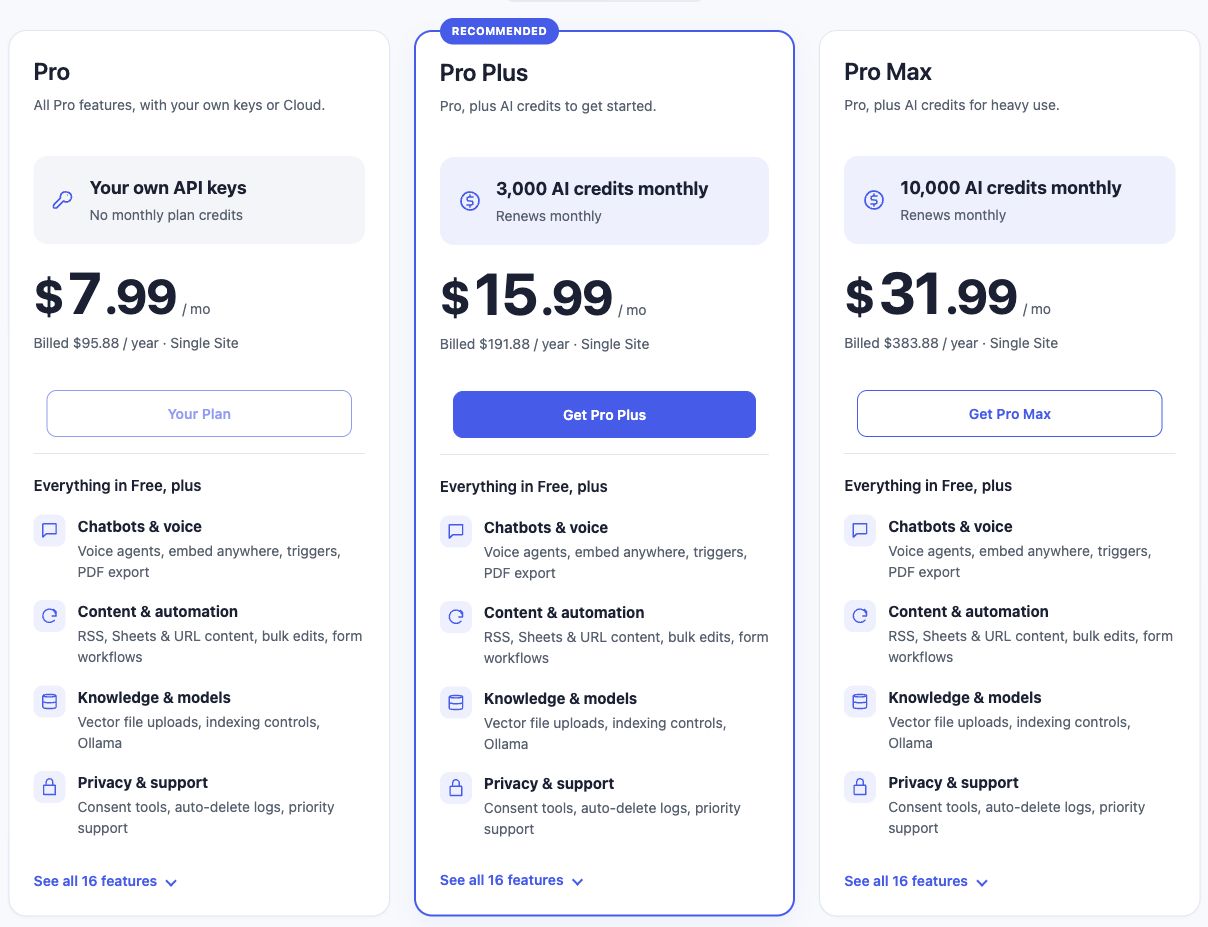
Cloud is optional on every plan. Using a direct provider with your own API key uses that provider’s billing instead of your AI Puffer credits. Realtime voice uses a separate direct OpenAI connection.
Prices in USD
Prices are before any applicable checkout taxes or discounts. Check the pricing page and Freemius checkout for the current total.
Monthly credits
- Renews monthly: Plus and Max credits renew each monthly period, including when you pay annually. An annual Plus subscription does not issue 36,000 credits upfront.
- No rollover: Unused included credits expire at the end of their monthly period.
- Shared across sites: A 2-site Plus license includes 3,000 monthly credits total, not 3,000 per site. A 2-site Max license includes 10,000 total. Connect both sites to the same Cloud account to share the balance.
- Connection required: Activate the paid license, connect Cloud using the same Freemius account, and verify the email if requested. A plugin purchase does not automatically connect Cloud.
- Separate free allowance: Eligible verified accounts can also receive the 25-credit free monthly allowance. It is separate from included plan credits and follows its own renewal date.
Credits are not a message count
One credit is not necessarily one reply, article, or image. Text requests use token pricing with a model-specific minimum. Longer output, conversation history, instructions, and knowledge context can increase the charge. Image, audio, and embedding models have their own rates. An article with SEO fields and images can make several requests. Each Cloud request uses credits. See request pricing and reservations.Top-ups
Optional one-time top-ups remain available on Free, Pro, Pro Plus, and Pro Max.- Open AI Puffer > Usage > Overview.
- Click Buy credits.
- Choose a pack and check that the checkout email matches the Cloud account you want to fund.
- Complete checkout, return to WordPress, and refresh your balance.
Lifetime Pro
Lifetime is available for Pro only. It unlocks Pro plugin features and includes no monthly paid-plan AI credits. You can still connect Cloud, receive the eligible free allowance, and buy top-ups, or use your own provider keys. Plus and Max require monthly or annual subscriptions. A lifetime Pro license does not become a recurring credit subscription automatically.Change or cancel a plan
Use AI Puffer > Pricing in WordPress or the Freemius customer portal to review available upgrades and billing options. Check Freemius’s checkout total and effective date before confirming a change.- Upgrade: Cloud reconciles the paid entitlement. It increases the current period’s allowance when applicable; it does not repeatedly issue a fresh full allowance on each plan change.
- Change site count: The software license covers the selected number of sites. Changing from 1 to 2 sites does not multiply the plan’s monthly credits.
- Cancel auto-renewal: Stops future subscription charges. Monthly credit renewals can continue during already paid coverage, including the remaining months of an annual subscription. They stop when that coverage ends.
- Downgrade to Pro or Free: No new Plus/Max allowance is issued after the credit-bearing entitlement ends. Purchased top-ups remain separate.
- Refund: Refunded payments can reverse associated credits. A refund does not create another monthly allowance.